
For bloggers
PlanetFOSS for your WordPress blog
A free plugin shows your readers what the Linux and open source news are talking about: a topic card below your posts and a news list for your sidebar. It fits into your theme and loads nothing from third parties.
Download · 0.2.2 GPL 2.0 or later · WordPress 6.6+ · PHP 8.1+ Without WordPress: the interface →
What it shows
- 1
Topic card
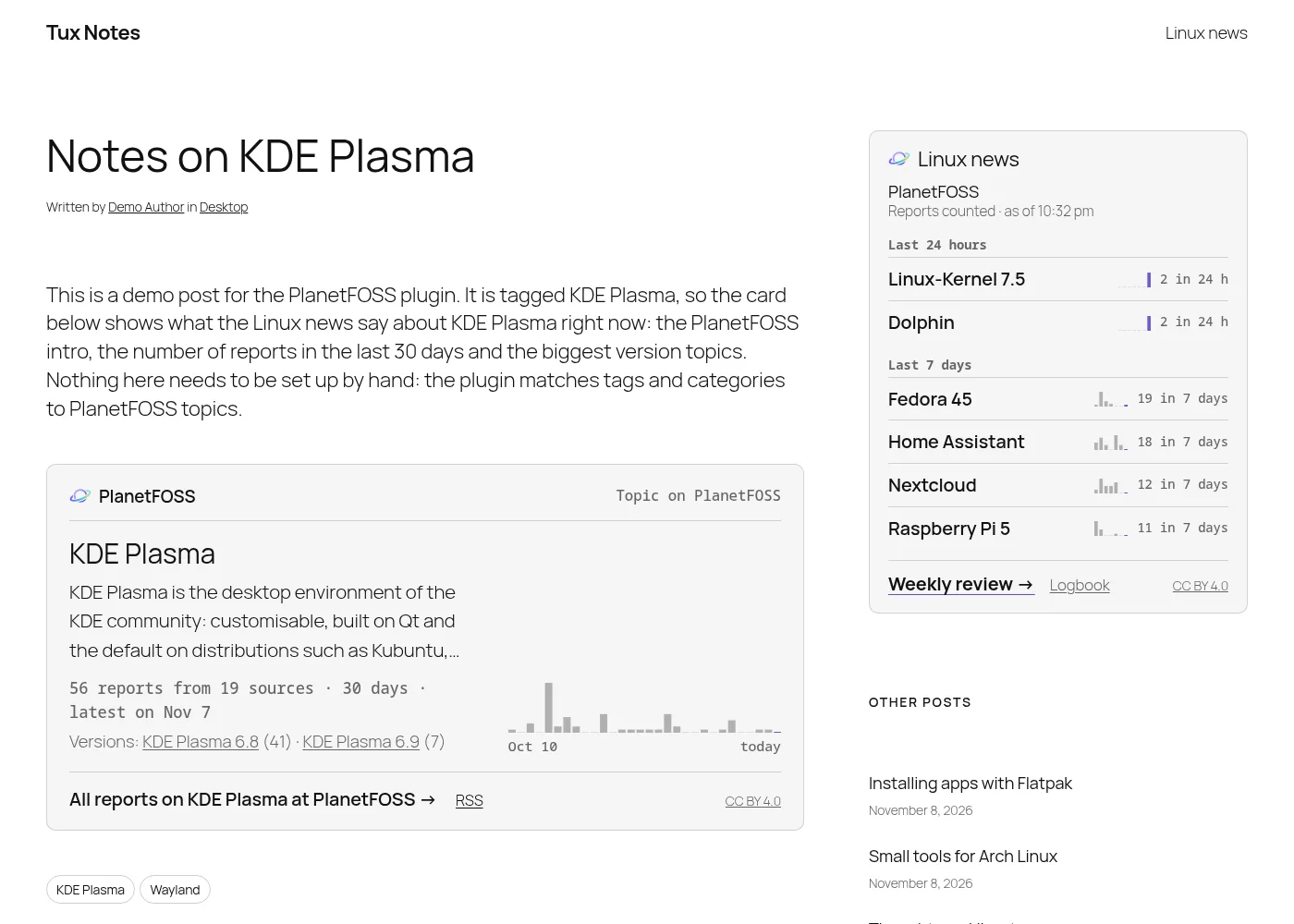
Below a post tagged “KDE Plasma”: the PlanetFOSS topic with a short intro, reports and sources of the last 30 days, a daily chart, the biggest versions and a link to all reports.
- 2
Linux news
For the sidebar: the topics with the most reports in the last 24 hours and the last 7 days, each with a small seven-day chart, plus the weekly review.
- 3
No setup
Tags and categories are matched to PlanetFOSS topics automatically. If your blog is a PlanetFOSS source, its own sorting of your posts is used first.
- 4
No tracking
Your server fetches the data every 30 minutes. Your readers load nothing from planetfoss.net – no script, no font, no cookie. Links name your site as campaign (utm_source), so PlanetFOSS can tell you how many readers you sent – never anything about the reader.
Fits your theme
Font, text and link colour come from the theme, sizes are in em, and every rule uses a single class – your own CSS wins. Quick changes go through custom properties, the block style “Plain” removes the box, and the stylesheet can be switched off entirely.
/* Example: match your brand colour, no box in the sidebar */
.planetfoss { --planetfoss-accent: #e95420; }
.sidebar .planetfoss { --planetfoss-border: 0; --planetfoss-surface: transparent; --planetfoss-pad: 0; }
.planetfoss__h { font-family: var(--my-heading-font); }
Installation
- Upload the ZIP under Plugins → Add New → Upload, then activate it.
- Settings → PlanetFOSS shows whether the first fetch worked.
- Block themes: put the block “PlanetFOSS topic” below the post content in the single post template and “PlanetFOSS Linux news” into a sidebar. Classic themes: widget “PlanetFOSS Linux news” and the option “Card below posts”.
- Shortcodes for page builders:
[planetfoss_topic],[planetfoss_news layout="columns"]
For developers: the interface
The plugin is only one way to use the data. Every other site, app or newsletter tool can fetch the same JSON – free, without registration, under the licence below.
GET https://planetfoss.net/api/verbund/v1/themen.json?lang=en
curl 'https://planetfoss.net/api/verbund/v1/themen.json?lang=en&site=example.org'langdeoren: language of intros and links (defaultde).site- Optional: host name of your site. If it is a PlanetFOSS source,
postscontains the topics PlanetFOSS gave your posts. topics- Every topic with at least two reports in 30 days, by key:
label,url,feed,intro,n(reports),sources,de/en,days(30 daily values, oldest first),versions. now,top7- Topics with the most reports in the last 24 hours (
n24,sources24) and the last 7 days (n,sources), each withstatus(supernova, komet, nachgluehen) anddays7. week- Supernovas of the last 7 days, links to the weekly review and the logbook.
license,terms_url- Licence (CC BY 4.0) and the terms below.
Only what PlanetFOSS produces itself: no headlines or texts of the sources. The answer is renewed every few minutes and cached for ten; fetch it at most every ten minutes. Without a key there is a limit of a few requests per hour per server (HTTP 429 with Retry-After). Changes within v1 only add fields; anything breaking gets a new address.
Licence and terms of use
The data of the export – topic names, intros, counts and charts – are licensed under Creative Commons Attribution 4.0 International (CC BY 4.0). You may use, change and pass them on, also commercially, as long as you:
- name PlanetFOSS as the source with a link to planetfoss.net (or the topic page),
- name the licence CC BY 4.0 with a link, and
- say if you changed the data.
The plugin does all of this by itself. Not covered: the articles of the sources PlanetFOSS links to, and the PlanetFOSS logo.
Using the interface
- Free of charge and without registration. Without a key there is a limit of a few requests per hour per server (the plugin needs two).
- The answer changes at most every ten minutes – please do not fetch more often.
- There is no guarantee of availability. PlanetFOSS may change the export (new versions keep their own address) and block servers that strain the interface.
- What your server sends: language, the host name of your site and its address in the User-Agent – nothing about your readers. PlanetFOSS counts requests per host; for the limit it keeps a one-way hash of the server’s IP address for at most two hours. Clicks from the boxes are counted per site as daily totals; site names are kept for 90 days. Ask us how many readers your site sent. Privacy policy (German)